Unreal Insights is a telemetry capture and analysis suite that can capture events from your project at high data rates. Unreal Insights helps you identify areas of data that might require optimization.
The major components of Unreal Insights are:
-
Trace events, which contain
EventNameandFieldNameparameters to define an event and specify a field that the event should include. -
The Unreal Trace Server, which records and saves traces from the application.
-
Unreal Insights, which analyzes and visualizes the data.
How to read Unreal Insight and make sense what’s going on (maybe I should write a blog post on this):
which order I should read things and what to look for
look at the Frame panel and see which frame exceeds the frame time budget, and then look for bars in the Timing panel see which thread takes more time. Beware that scenarios like game thread looks like taking more time but actually it might be waiting for worker thread to finish task for async loading thread and game thread might not be the actual bottleneck.
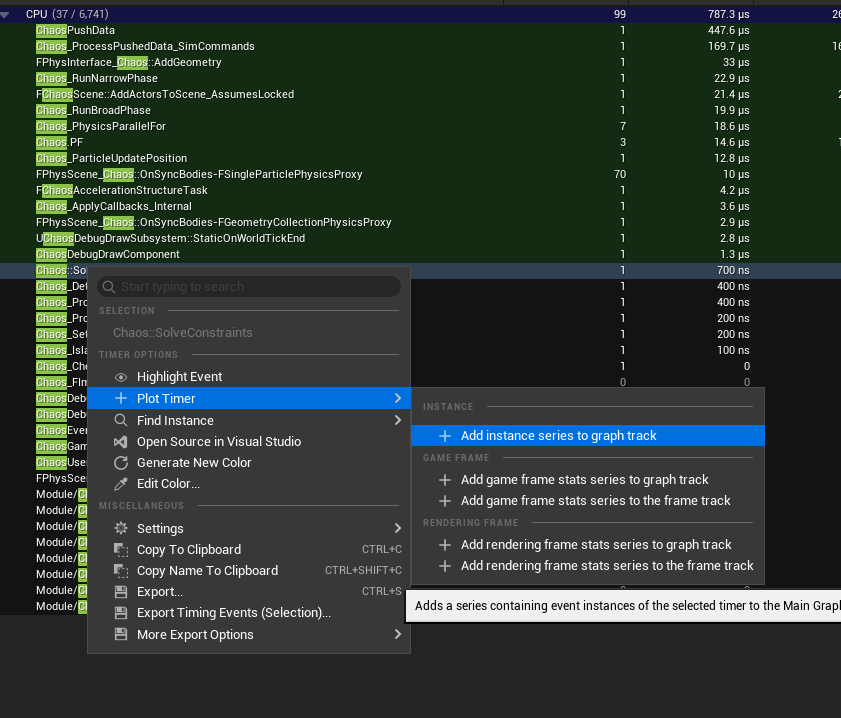
I can plot graph by right-click plot timer-> Add Instance series to graph track of specific functions to check for any spikes in Main Graph
References: https://dev.epicgames.com/documentation/unreal-engine/unreal-insights-in-unreal-engine https://www.youtube.com/watch?v=HQLYkwoDoT4 https://www.youtube.com/watch?v=KxREK-DYu70 - Game thread optimization.