1. Dynamic Material Instances (DMI)
Best for: Individual actors needing unique values (e.g., a specific character’s health glow or a unique UI element).
How it works: It creates a unique copy of the material for that specific actor.
Performance Note: Using too many unique DMIs can prevent the engine from batching draw calls, which may impact performance if used on hundreds of objects.
2. Custom Primitive Data (CPD)
How it works: Data is stored directly on the PrimitiveComponent. Unlike DMIs, CPD allows the engine to batch different-colored meshes into a single draw call, drastically reducing CPU overhead.
Material Setup:
- In the Material Editor, select a Parameter node.
- Check Use Custom Primitive Data in the Details panel.
- Assign a Primitive Data Index (e.g., 0). https://dev.epicgames.com/documentation/unreal-engine/storing-custom-data-in-unreal-engine-materials-per-primitive
3. Material Parameter Collections (MPC)
Best for: Global variables that affect every material in the game (e.g., Wind Speed, Snow Coverage, or Global Wetness).
How it works: A single asset stores values that all materials can reference. Updating a value in the MPC instantly updates every material using it across the entire world.
Need to create an asset in content browser and then use that asset in the materials.
A single Material Parameter Collection can hold up to 1024 Scalar Parameters and 1024 Vector Parameters. Modifying the number of parameters in a collection will cause a recompile of all Materials that reference that collection. If you need to add numerous parameters, it can be faster to add a lot of parameters up front in an empty map.
If you rename a parameter, any Materials referencing that parameter will continue to work as expected. However, any Blueprint referencing that parameter will now be broken. You must reassign the ParameterName of the Blueprint function which operates on the collection to fix this.
Updating values in a MaterialParameterCollection is much more efficient than setting many different parameters on various Material instances.
4. Per Instance Custom Data
Best for: Massive numbers of unique instances (e.g., 1,000 projectiles, each with a different color).
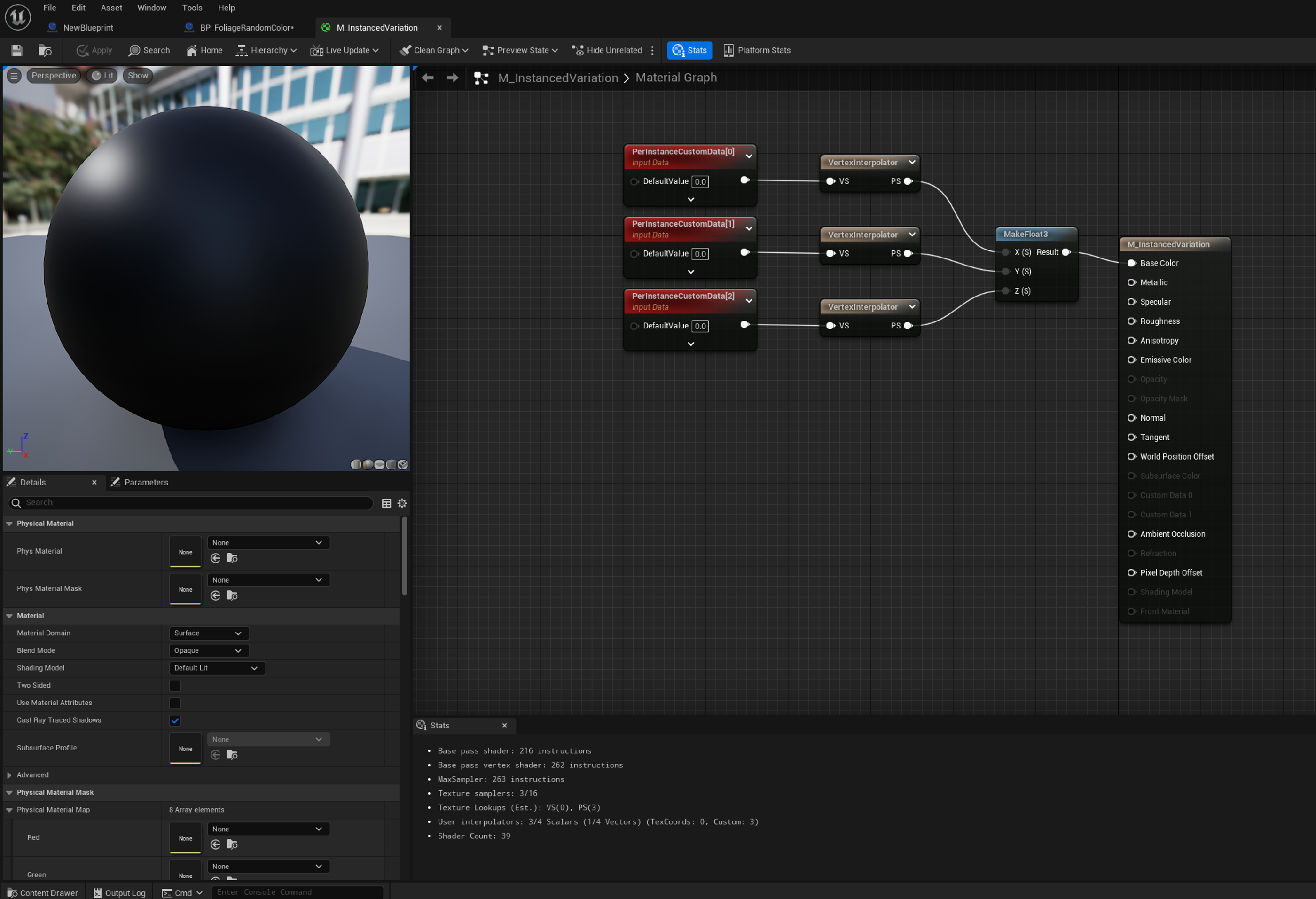
How it works: Float data stored per instance on an Instanced Static Mesh (ISM) component. All instances are part of one component (draw calls are combined), but each instance carries its own values. CPD on an ISM applies one value to every instance in the component; Per Instance Custom Data is the per-instance version.
Component Setup:
- Set Num Custom Data Floats on the ISM component in the Details panel,
- The number of elements is based on the following formula: (Num Custom Data Floats) x (Number of instances) = Total Number of Indexes
- If the ISM is created at runtime, call
SetNumCustomDataFloats()in C++ before writing data. It reallocates the buffer and resets every value to 0.
Material Setup:
- Use the PerInstanceCustomData node (scalar) or PerInstanceCustomData3Vector (color; Data Index 0 covers floats 0–2).
- Set the node’s Data Index.
- This is NOT the CPD checkbox. “Use Custom Primitive Data” on a parameter does not read per-instance data.
- Route the value through a VertexInterpolator before using it in the pixel shader (community-reported requirement; verify in 5.8).
C++:
#include "Components/InstancedStaticMeshComponent.h"

Projectiles->SetNumCustomDataFloats(5); // Tint RGB (0-2), Emissive (3), DeathTime (4)

const int32 Idx = Projectiles->AddInstance(SpawnTransform, /*bWorldSpace=*/true);
const float Data[] = { Tint.R, Tint.G, Tint.B, 5.f, 0.f };
Projectiles->SetCustomData(Idx, MakeArrayView(Data), /*bMarkRenderStateDirty=*/true);

Projectiles->SetCustomDataValue(Idx, 4, DeathTime, true); // update a single float
also when sending tint color you would usually pack that as uint32, to save on memory
Blueprint: Set Custom Data Value node (Instance Index, Custom Data Index, Value, Mark Render State Dirty).
https://dev.epicgames.com/community/learning/tutorials/wdMm/unreal-engine-deterministic-replacement-for-material-perinstancerandom-for-ndisplay https://dev.epicgames.com/documentation/unreal-engine/instanced-static-mesh-component-in-unreal-engine#custom-data
5. Vertex Colors & Texture Masks
Best for: Static variation or blending (e.g., painting moss on a rock or wear-and-tear on a wall).
How it works: Data is baked into the mesh’s vertices or stored in a texture.
Workflow:
- In the Material, use the Vertex Color node.
- Use the Mesh Paint mode in the Editor to manually paint values onto the mesh.
Summary & Decision Guide
| Method | Scope | Performance | Can Batch? | Best Use Case |
|---|---|---|---|---|
| MPC | Global | Excellent | Yes | Global weather, Time of day |
| CPD | Per component | Excellent | Yes | objects like walls and floors or other duplicated geometry |
| DMI | Per-Actor | Moderate | No | Character customization, localized damage |
| Vertex Color | Per-Mesh | Best | Yes | Environment blending, static masks |
| Per Instance Custom Data | Per-Instance (ISM) | Excellent | Thousands of unique bullets/asteroids| |
Best Practices for UE 5.8:
- Prefer CPD over DMI whenever you have more than a few dozen instances of the same mesh.
- Avoid Tick: Use Events or Timelines to update material parameters rather than updating them every frame in Tick.
- Use Named Constants: In C++, cache your FNameparameters (e.g., static const FName GlowParam = FName(“Glow”);) to avoid string-hashing overhead during updates.